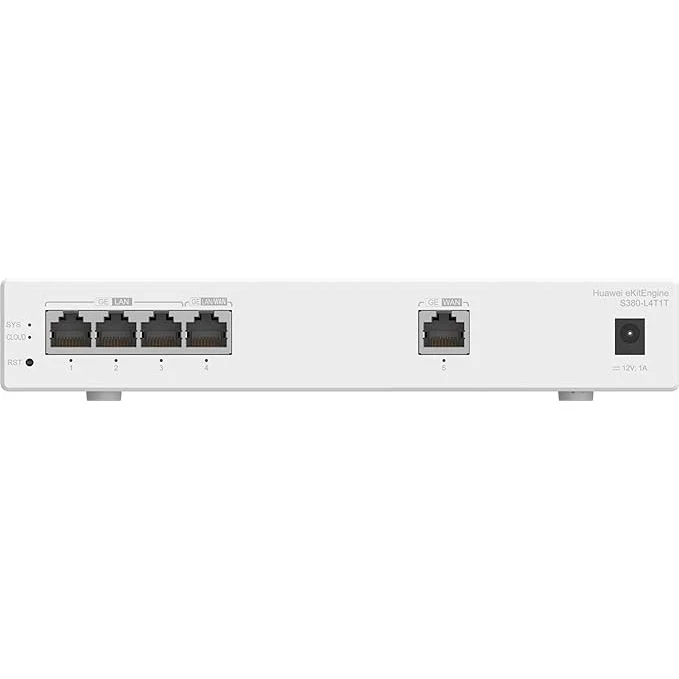
Huawei eKit S380-L4T1T Network Gateway - 1*GE WAN, 4*GE LAN, Up To 150 Users, Firewall and Forwarding Performance, 2Gbps
Huawei eKit S380-L4T1T Network Gateway - 1*GE WAN, 4*GE LAN, Up To 150 Users, Firewall and Forwarding Performance, 2Gbps
Huawei eKit S380-L4T1T Network Gateway - 1*GE WAN, 4*GE LAN, Up To 150 Users, Firewall and Forwarding Performance, 2Gbps
Key Features
-
Components:
- CLOUD Indicator
- SYS Indicator
-
RST Button:
- NOTICE: To restore the factory settings and reset the device, hold down the button for at least 6 seconds. To reset the device, press the button.
- Three GE LAN Electrical Ports
- One GE LAN/WAN Electrical Port
- One GE WAN Electrical Port
- Port Indicator
-
Power Adapter Socket
- NOTE: Use the power adapter (12 V 1 A) delivered with the device.
- Ground Screw
-
Ports:
- GE LAN Electrical Port: RJ45, a GE LAN electrical port sends and receives LAN service data at 10/100/1000 Mbit/s. Available components: Ethernet cable.
- GE WAN Electrical Port: RJ45, a GE WAN electrical port sends and receives WAN service data at 10/100/1000 Mbit/s. Available components: Ethernet cable.
- GE LAN/WAN Electrical Port: RJ45, a GE LAN/WAN electrical port sends and receives LAN or WAN service data at 10/100/1000 Mbit/s. Available components: Ethernet cable.
-
Indicators and Buttons:
-
SYS (System Status Indicator)
- Off: The system is not running or is in the reset state.
- Green (Fast Blinking): The system is in the power-on loading or reset startup state.
- Green (Slow Blinking): The system is running normally.
- Green (Steady On): During the system startup preparation phase, the SYS indicator is steady green, which lasts for a maximum of 15 seconds.
- Red (Steady On): The device cannot be started or the power supply is faulty.
-
Cloud Indicator
- Off: The device is not in the cloud management state.
- Blue (Fast Blinking): The device is connecting to the cloud.
- Blue (Slow Blinking): The device is in the cloud management state.
- Blue (Steady On): The network is connected, and the WAN port obtains an IP address.
- NOTE: This function is available in V600R023C00 and later versions.
-
Port Indicator
- Off: The port is not connected or has been shut down.
- Green (Steady On): A link has been established on the port.
- NOTE: During device startup, all port indicators are steady green for about 2 seconds and then off, indicating that service initialization is complete.
- Green (Blinking): The port is sending or receiving data.
-
SYS (System Status Indicator)
-
Power Supply System: The device is powered by the power adapter delivered with the device.
-
Heat Dissipation System: The device has no fans and uses natural heat dissipation.
-
Technical Specifications:
-
Dimensions without Packaging (H x W x D):
- Basic dimensions (excluding the parts protruding from the body): 35.0 mm x 210.0 mm x 130.0 mm (1.38 in. x 8.27 in. x 5.12 in.)
- Maximum dimensions (the depth is the distance from ports on the front panel to the parts protruding from the rear panel): 35.0 mm x 210.0 mm x 136.3 mm (1.38 in. x 8.27 in. x 5.37 in.)
- Dimensions with Packaging (H x W x D): 90.0 mm x 285.0 mm x 180.0 mm (3.54 in. x 11.22 in. x 7.09 in.)
- Chassis Height [U]: 0.8 U
- Chassis Material: Metal
- Weight without Packaging: 0.8 kg (1.76 lb)
- Weight with Packaging: 1.0 kg (2.2 lb)
- Typical Power Consumption: 5.99 W
- Typical Heat Dissipation: 27.3 BTU/hour
-
Dimensions without Packaging (H x W x D):
More Images


Huawei eKit S380-L4T1T Network Gateway - 1*GE WAN, 4*GE LAN, Up To 150 Users, Firewall and Forwarding Performance, 2Gbps
Huawei eKit S380-L4T1T Network Gateway - 1*GE WAN, 4*GE LAN, Up To 150 Users, Firewall and Forwarding Performance, 2Gbps
Key Features
-
Components:
- CLOUD Indicator
- SYS Indicator
-
RST Button:
- NOTICE: To restore the factory settings and reset the device, hold down the button for at least 6 seconds. To reset the device, press the button.
- Three GE LAN Electrical Ports
- One GE LAN/WAN Electrical Port
- One GE WAN Electrical Port
- Port Indicator
-
Power Adapter Socket
- NOTE: Use the power adapter (12 V 1 A) delivered with the device.
- Ground Screw
-
Ports:
- GE LAN Electrical Port: RJ45, a GE LAN electrical port sends and receives LAN service data at 10/100/1000 Mbit/s. Available components: Ethernet cable.
- GE WAN Electrical Port: RJ45, a GE WAN electrical port sends and receives WAN service data at 10/100/1000 Mbit/s. Available components: Ethernet cable.
- GE LAN/WAN Electrical Port: RJ45, a GE LAN/WAN electrical port sends and receives LAN or WAN service data at 10/100/1000 Mbit/s. Available components: Ethernet cable.
-
Indicators and Buttons:
-
SYS (System Status Indicator)
- Off: The system is not running or is in the reset state.
- Green (Fast Blinking): The system is in the power-on loading or reset startup state.
- Green (Slow Blinking): The system is running normally.
- Green (Steady On): During the system startup preparation phase, the SYS indicator is steady green, which lasts for a maximum of 15 seconds.
- Red (Steady On): The device cannot be started or the power supply is faulty.
-
Cloud Indicator
- Off: The device is not in the cloud management state.
- Blue (Fast Blinking): The device is connecting to the cloud.
- Blue (Slow Blinking): The device is in the cloud management state.
- Blue (Steady On): The network is connected, and the WAN port obtains an IP address.
- NOTE: This function is available in V600R023C00 and later versions.
-
Port Indicator
- Off: The port is not connected or has been shut down.
- Green (Steady On): A link has been established on the port.
- NOTE: During device startup, all port indicators are steady green for about 2 seconds and then off, indicating that service initialization is complete.
- Green (Blinking): The port is sending or receiving data.
-
SYS (System Status Indicator)
-
Power Supply System: The device is powered by the power adapter delivered with the device.
-
Heat Dissipation System: The device has no fans and uses natural heat dissipation.
-
Technical Specifications:
-
Dimensions without Packaging (H x W x D):
- Basic dimensions (excluding the parts protruding from the body): 35.0 mm x 210.0 mm x 130.0 mm (1.38 in. x 8.27 in. x 5.12 in.)
- Maximum dimensions (the depth is the distance from ports on the front panel to the parts protruding from the rear panel): 35.0 mm x 210.0 mm x 136.3 mm (1.38 in. x 8.27 in. x 5.37 in.)
- Dimensions with Packaging (H x W x D): 90.0 mm x 285.0 mm x 180.0 mm (3.54 in. x 11.22 in. x 7.09 in.)
- Chassis Height [U]: 0.8 U
- Chassis Material: Metal
- Weight without Packaging: 0.8 kg (1.76 lb)
- Weight with Packaging: 1.0 kg (2.2 lb)
- Typical Power Consumption: 5.99 W
- Typical Heat Dissipation: 27.3 BTU/hour
-
Dimensions without Packaging (H x W x D):
Product Information
Product Information
Shipping & Returns
Shipping & Returns
Description
Huawei eKit S380-L4T1T Network Gateway - 1*GE WAN, 4*GE LAN, Up To 150 Users, Firewall and Forwarding Performance, 2Gbps
Key Features
-
Components:
- CLOUD Indicator
- SYS Indicator
-
RST Button:
- NOTICE: To restore the factory settings and reset the device, hold down the button for at least 6 seconds. To reset the device, press the button.
- Three GE LAN Electrical Ports
- One GE LAN/WAN Electrical Port
- One GE WAN Electrical Port
- Port Indicator
-
Power Adapter Socket
- NOTE: Use the power adapter (12 V 1 A) delivered with the device.
- Ground Screw
-
Ports:
- GE LAN Electrical Port: RJ45, a GE LAN electrical port sends and receives LAN service data at 10/100/1000 Mbit/s. Available components: Ethernet cable.
- GE WAN Electrical Port: RJ45, a GE WAN electrical port sends and receives WAN service data at 10/100/1000 Mbit/s. Available components: Ethernet cable.
- GE LAN/WAN Electrical Port: RJ45, a GE LAN/WAN electrical port sends and receives LAN or WAN service data at 10/100/1000 Mbit/s. Available components: Ethernet cable.
-
Indicators and Buttons:
-
SYS (System Status Indicator)
- Off: The system is not running or is in the reset state.
- Green (Fast Blinking): The system is in the power-on loading or reset startup state.
- Green (Slow Blinking): The system is running normally.
- Green (Steady On): During the system startup preparation phase, the SYS indicator is steady green, which lasts for a maximum of 15 seconds.
- Red (Steady On): The device cannot be started or the power supply is faulty.
-
Cloud Indicator
- Off: The device is not in the cloud management state.
- Blue (Fast Blinking): The device is connecting to the cloud.
- Blue (Slow Blinking): The device is in the cloud management state.
- Blue (Steady On): The network is connected, and the WAN port obtains an IP address.
- NOTE: This function is available in V600R023C00 and later versions.
-
Port Indicator
- Off: The port is not connected or has been shut down.
- Green (Steady On): A link has been established on the port.
- NOTE: During device startup, all port indicators are steady green for about 2 seconds and then off, indicating that service initialization is complete.
- Green (Blinking): The port is sending or receiving data.
-
SYS (System Status Indicator)
-
Power Supply System: The device is powered by the power adapter delivered with the device.
-
Heat Dissipation System: The device has no fans and uses natural heat dissipation.
-
Technical Specifications:
-
Dimensions without Packaging (H x W x D):
- Basic dimensions (excluding the parts protruding from the body): 35.0 mm x 210.0 mm x 130.0 mm (1.38 in. x 8.27 in. x 5.12 in.)
- Maximum dimensions (the depth is the distance from ports on the front panel to the parts protruding from the rear panel): 35.0 mm x 210.0 mm x 136.3 mm (1.38 in. x 8.27 in. x 5.37 in.)
- Dimensions with Packaging (H x W x D): 90.0 mm x 285.0 mm x 180.0 mm (3.54 in. x 11.22 in. x 7.09 in.)
- Chassis Height [U]: 0.8 U
- Chassis Material: Metal
- Weight without Packaging: 0.8 kg (1.76 lb)
- Weight with Packaging: 1.0 kg (2.2 lb)
- Typical Power Consumption: 5.99 W
- Typical Heat Dissipation: 27.3 BTU/hour
-
Dimensions without Packaging (H x W x D):